
Email is one of the most important marketing tools for getting your audience to stay connected with your brand. Not yet convinced? Let’s dish out some stats. According to HubSpot email generates £30 for less than £1 that is spent, which is an astounding 4,200% ROI, making it one of the most effective options available and one of the easiest companies to use for this is Mailchimp.
Mailchimp, is an easy and free website used for creating and sending newsletters to your clients/customers via email. Despite Mailchimp being very user friendly, they have made the system so secure, that it is tricky to find how to how to enable and disable Two-Factor Authentication.
What Is Two-Factor Authentication?
Two-Factor Authentication is an extra layer of protection that you can set up for any online accounts that you create. The purpose is to make it harder for hackers to get access to your account, even if they know your password.
This works by providing additional details for logging in to a new or existing account that you will have easy access to. These can either be; another email address, your mobile phone number or an authenticator app so that you can login and regain access to your account in the event of hacking. The process is required to ensure that only those who need access, can get into the account.
Common Ways For Hackers to Gain Access To Your Account(s):
- Using the same password for every account.
- Using names or birthdays as the password.
- Not using strong enough passwords.
- Saving passwords to your browser.
What Are The Benefits of Two-Factor Authentication?
There are many benefits to setting up and using this:
- It reduces the risk of hackers getting access to sensitive information.
- Helps keep private information secure. As more people are now working from home, it’s important that any company information can be accessed and stored safely and securely.
- It reduces the need to have your password reset by a help desk as you are able to do this yourself.
- It reinforces trust in your company.
How Do I Set Up Two-Factor Authentication In Mailchimp?
Once you have logged into Mailchimp, click on your logo icon in the bottom left corner. From here, select choose “Profile”.

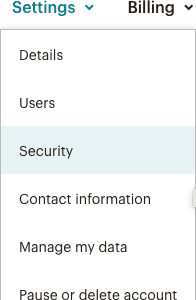
On the next screen from the “Settings” tab select “Security”.
The next screen will bring to a page that looks like this:

From here, select ‘ Enable two-factor authentication for these accounts’ to enable or disable Two-Factor Authentication. This will allow you to decide the options that are available for setting this up. Either by using an ‘Authenticator’ or ‘SMS’.
You can also decide whether to set up Two-Factor Authentication for Admins, Owners, Managers, Authors and Viewers.
Two Factor Authenticator Apps
In a bid to help you with setting up Two-Factor Authentication you can use an app which generates a code for you to put in when signing into your account anytime you log in from an unrecognised device or location. A few of our recommended apps are:
So, there you have it – now you can keep your Mailchimp account(s) even more protected by setting up this method.
Do you already have Mailchimp but you’re not sure how to go about managing your email marketing campaigns? Or maybe you’ve never used Mailchimp and want to know how to get the most of it? Then visit our website today and find out how we can assist you with this.